Webhooks
OpenRegister includes a built-in webhook system that enables two powerful use cases: event notifications and business logic integration. Webhooks allow you to trigger external workflows and integrations whenever events occur within OpenRegister, enabling seamless integration with external systems and complex business rule validation.
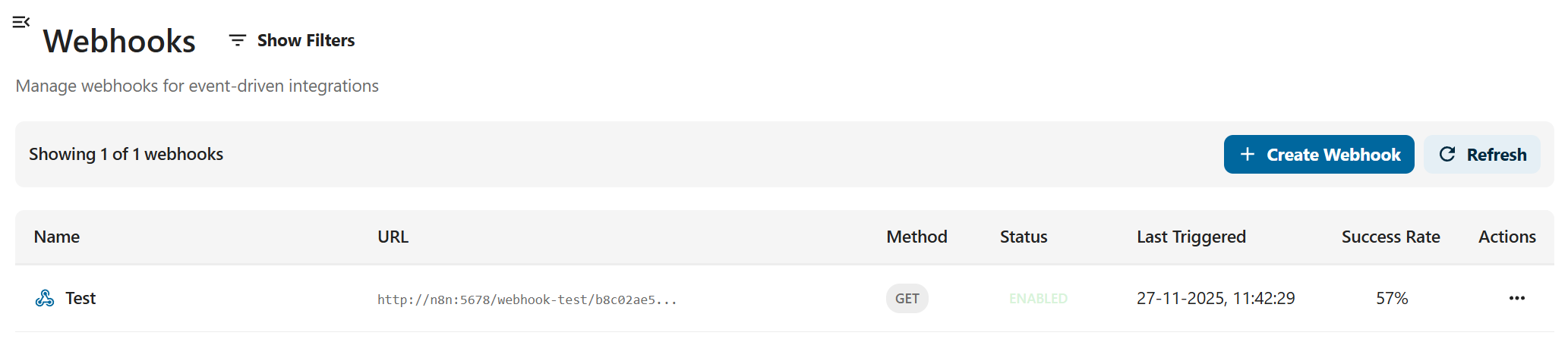
Overview
Webhooks serve two primary purposes in OpenRegister:
- Event Notifications: Send CloudEvents to external systems when objects experience CRUD operations
- Business Logic Integration: Add complex business rules and decision-making to the internal flow of registers
OpenRegister's webhook system provides a robust, production-ready solution with automatic retries, event filtering, and comprehensive monitoring.
Use Case 1: Event Notifications
The simplest use case for webhooks is notifying external systems when objects are created, updated, or deleted. This enables real-time synchronization between OpenRegister and other applications.
Example: Pet Store Inventory Sync
Imagine a pet store using OpenRegister to manage its inventory. When a new cat is added to the store, the point-of-sale (POS) system needs to be notified so it can include the new product in its product list.
Configuration:
{
  "name": "POS Inventory Sync",
  "url": "https://pos-system.example.com/api/products",
  "method": "POST",
  "events": ["OCA\\OpenRegister\\Event\\ObjectCreatedEvent"],
  "filters": {
    "objectType": "object",
    "schema": "pet-store-cat-schema"
  },
  "enabled": true
}
When a cat object is created, OpenRegister automatically sends a CloudEvent to the POS system, which then updates its product catalog in real-time.
Use Case 2: Business Logic and Decision Making
Webhooks can also be used to add complex business logic and decision-making to the internal flow of registers. This is particularly useful when validation rules are too complex for JSON schema validation.
Example: Complex Pet Store Rules
Consider a pet store with complex business rules:
- Rule 1: Cannot create cats named "Felix" in the month of December
- Rule 2: Cannot create cats named "Felix" when there are already 5 or more cats with that name in the store
These rules involve:
- Date-based validation (checking if current month is December)
- Aggregation logic (counting existing cats with the same name)
- External data validation (potentially checking against external APIs)
JSON schema validation cannot handle this complexity. Instead, we can use webhooks to register to the object pre-create event and fire a synchronous webhook to an external tool like n8n that allows us to graphically build business logic flows.
Configuration:
{
  "name": "Felix Cat Validation",
  "url": "http://n8n:5678/webhook/felix-validation",
  "method": "POST",
  "events": ["OCA\\OpenRegister\\Event\\ObjectCreatingEvent"],
  "filters": {
    "objectType": "object",
    "schema": "pet-store-cat-schema",
    "data.@self.name": "Felix"
  },
  "enabled": true,
  "configuration": {
    "interceptRequests": true,
    "async": false,
    "processResponse": true,
    "responseProcessing": {
      "mergeStrategy": "merge"
    }
  }
}
n8n Workflow Capabilities:
The n8n workflow can perform complex operations that JSON schema cannot:
- Date/Time Logic: Check if current date is in December
- API Queries: Query OpenRegister API to count existing cats with name "Felix"
- External API Calls: Validate against external services (e.g., check if Felix is a registered trademark, verify against pet registry databases)
- Data Transformation: Transform or enrich the request data before validation
- Conditional Logic: Implement complex if/then/else rules
- Aggregations: Count, sum, or perform other aggregations on existing data
Response Handling:
The n8n workflow returns a response that OpenRegister uses to determine whether to continue:
- Success Response: Object creation proceeds
- Error Response: Object creation is blocked, error message shown to user
This enables powerful business logic that would be impossible to implement with JSON schema alone.
Key Features
- Event-Driven Architecture: Subscribe to specific OpenRegister events
- Automatic Retries: Configurable retry policies (exponential, linear, fixed)
- Event Filtering: Filter events based on payload data
- Secure: HMAC-SHA256 signature verification
- Statistics: Track delivery success rates and last execution times
- Custom Headers: Add authentication headers or custom metadata
- Wildcard Support: Use wildcards to match multiple events
Requirements
- Nextcloud 28 or higher
- OpenRegister app installed and enabled
- External system to receive webhooks (n8n, Windmill, custom endpoint)
Managing Webhooks
OpenRegister provides a RESTful API for managing webhooks.

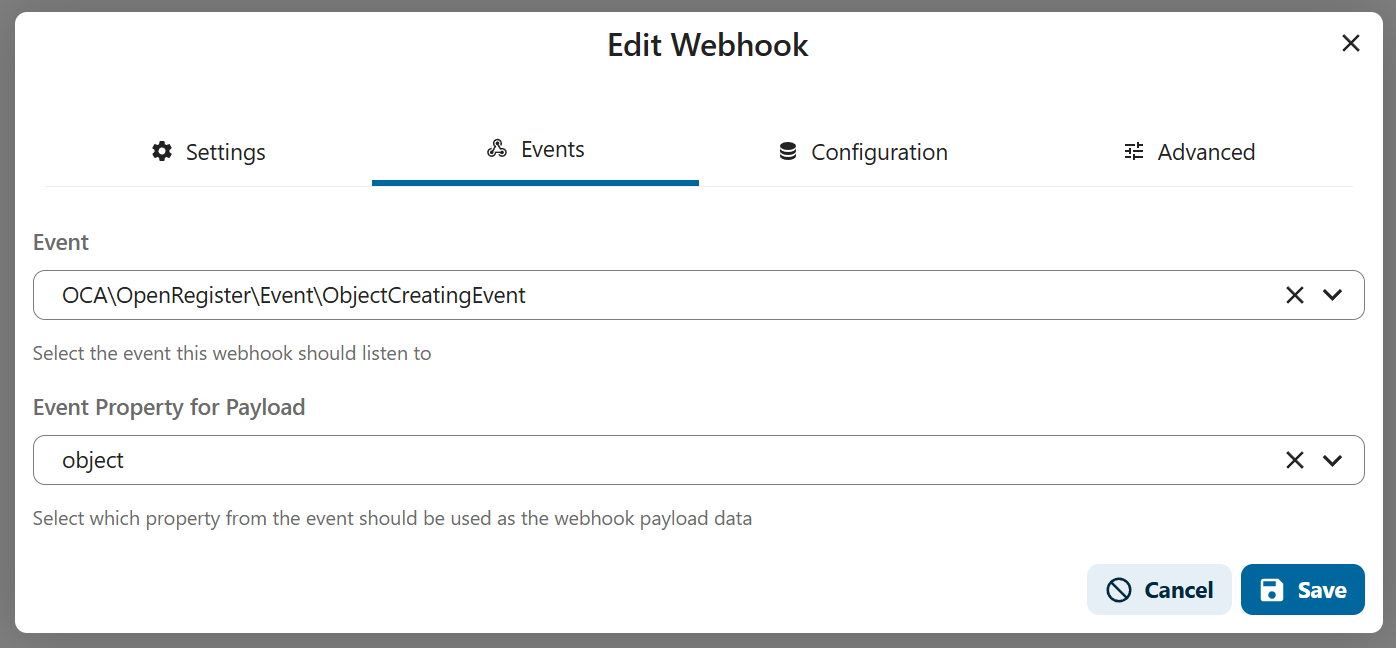


Creating a Webhook
curl -X POST http://localhost:8080/index.php/apps/openregister/api/webhooks \
  -u 'admin:admin' \
  -H 'Content-Type: application/json' \
  -d '{
    "name": "My Webhook",
    "url": "https://my-server.com/webhook",
    "method": "POST",
    "events": [
      "OCA\\OpenRegister\\Event\\ObjectCreatedEvent",
      "OCA\\OpenRegister\\Event\\ObjectUpdatedEvent"
    ],
    "enabled": true,
    "timeout": 30,
    "maxRetries": 3,
    "retryPolicy": "exponential"
  }'
Parameters
| Parameter | Type | Required | Description |
|---|---|---|---|
name | string | Yes | Webhook display name |
url | string | Yes | Target URL to call |
method | string | No | HTTP method: GET, POST, PUT, PATCH, DELETE (default: POST) |
events | array | No | Event class names (empty = all events) |
enabled | boolean | No | Enable/disable webhook (default: true) |
headers | object | No | Custom HTTP headers |
secret | string | No | Secret for HMAC signature |
filters | object | No | Event payload filters |
timeout | integer | No | Request timeout in seconds (default: 30) |
maxRetries | integer | No | Maximum retry attempts (default: 3) |
retryPolicy | string | No | Retry policy: exponential, linear, fixed (default: exponential) |
Listing Webhooks
curl -X GET http://localhost:8080/index.php/apps/openregister/api/webhooks \
  -u 'admin:admin'
Getting a Webhook
curl -X GET http://localhost:8080/index.php/apps/openregister/api/webhooks/{id} \
  -u 'admin:admin'
Updating a Webhook
curl -X PUT http://localhost:8080/index.php/apps/openregister/api/webhooks/{id} \
  -u 'admin:admin' \
  -H 'Content-Type: application/json' \
  -d '{
    "enabled": false
  }'
Deleting a Webhook
curl -X DELETE http://localhost:8080/index.php/apps/openregister/api/webhooks/{id} \
  -u 'admin:admin'
Testing a Webhook
curl -X POST http://localhost:8080/index.php/apps/openregister/api/webhooks/{id}/test \
  -u 'admin:admin'
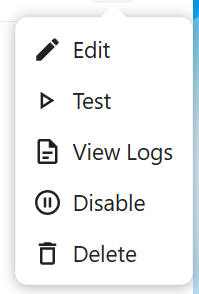
The test endpoint sends a test payload to verify webhook configuration. After testing, the webhook list automatically refreshes to show updated statistics (Last Triggered, Success Rate).
Listing Available Events
curl -X GET http://localhost:8080/index.php/apps/openregister/api/webhooks/events \
  -u 'admin:admin'
Available Events
OpenRegister dispatches events for all entity lifecycle operations. Below is a complete list of available events.
Object Events
| Event | Description | When Triggered |
|---|---|---|
OCA\OpenRegister\Event\ObjectCreatedEvent | Object created | After new object is saved |
OCA\OpenRegister\Event\ObjectUpdatedEvent | Object updated | After object is modified |
OCA\OpenRegister\Event\ObjectDeletedEvent | Object deleted | After object is removed |
OCA\OpenRegister\Event\ObjectLockedEvent | Object locked | After object is locked |
OCA\OpenRegister\Event\ObjectUnlockedEvent | Object unlocked | After object is unlocked |
OCA\OpenRegister\Event\ObjectRevertedEvent | Object reverted | After object is reverted to previous version |
Register Events
| Event | Description | When Triggered |
|---|---|---|
OCA\OpenRegister\Event\RegisterCreatedEvent | Register created | After new register is saved |
OCA\OpenRegister\Event\RegisterUpdatedEvent | Register updated | After register is modified |
OCA\OpenRegister\Event\RegisterDeletedEvent | Register deleted | After register is removed |
Schema Events
| Event | Description | When Triggered |
|---|---|---|
OCA\OpenRegister\Event\SchemaCreatedEvent | Schema created | After new schema is saved |
OCA\OpenRegister\Event\SchemaUpdatedEvent | Schema updated | After schema is modified |
OCA\OpenRegister\Event\SchemaDeletedEvent | Schema deleted | After schema is removed |
Application Events
| Event | Description | When Triggered |
|---|---|---|
OCA\OpenRegister\Event\ApplicationCreatedEvent | Application created | After new application is saved |
OCA\OpenRegister\Event\ApplicationUpdatedEvent | Application updated | After application is modified |
OCA\OpenRegister\Event\ApplicationDeletedEvent | Application deleted | After application is removed |
Agent Events
| Event | Description | When Triggered |
|---|---|---|
OCA\OpenRegister\Event\AgentCreatedEvent | Agent created | After new agent is saved |
OCA\OpenRegister\Event\AgentUpdatedEvent | Agent updated | After agent is modified |
OCA\OpenRegister\Event\AgentDeletedEvent | Agent deleted | After agent is removed |
Source Events
| Event | Description | When Triggered |
|---|---|---|
OCA\OpenRegister\Event\SourceCreatedEvent | Source created | After new source is saved |
OCA\OpenRegister\Event\SourceUpdatedEvent | Source updated | After source is modified |
OCA\OpenRegister\Event\SourceDeletedEvent | Source deleted | After source is removed |
Configuration Events
| Event | Description | When Triggered |
|---|---|---|
OCA\OpenRegister\Event\ConfigurationCreatedEvent | Configuration created | After new configuration is saved |
OCA\OpenRegister\Event\ConfigurationUpdatedEvent | Configuration updated | After configuration is modified |
OCA\OpenRegister\Event\ConfigurationDeletedEvent | Configuration deleted | After configuration is removed |
View Events
| Event | Description | When Triggered |
|---|---|---|
OCA\OpenRegister\Event\ViewCreatedEvent | View created | After new view is saved |
OCA\OpenRegister\Event\ViewUpdatedEvent | View updated | After view is modified |
OCA\OpenRegister\Event\ViewDeletedEvent | View deleted | After view is removed |
Conversation Events
| Event | Description | When Triggered |
|---|---|---|
OCA\OpenRegister\Event\ConversationCreatedEvent | Conversation created | After new conversation is saved |
OCA\OpenRegister\Event\ConversationUpdatedEvent | Conversation updated | After conversation is modified |
OCA\OpenRegister\Event\ConversationDeletedEvent | Conversation deleted | After conversation is removed |
Organisation Events
| Event | Description | When Triggered |
|---|---|---|
OCA\OpenRegister\Event\OrganisationCreatedEvent | Organisation created | After new organisation is saved |
OCA\OpenRegister\Event\OrganisationUpdatedEvent | Organisation updated | After organisation is modified |
OCA\OpenRegister\Event\OrganisationDeletedEvent | Organisation deleted | After organisation is removed |
Webhook Payload
All webhooks receive a standardized payload. The format depends on the HTTP method:
POST, PUT, PATCH, DELETE Methods
For these methods, the payload is sent as JSON in the request body:
{
  "event": "OCA\\OpenRegister\\Event\\ObjectCreatedEvent",
  "webhook": {
    "id": "550e8400-e29b-41d4-a716-446655440000",
    "name": "My Webhook"
  },
  "data": {
    "objectType": "object",
    "action": "created",
    "object": {
      "id": 123,
      "uuid": "abc-123",
      "...": "..."
    },
    "register": "my-register-uuid",
    "schema": "my-schema-uuid"
  },
  "timestamp": "2025-11-20T20:00:00+00:00",
  "attempt": 1
}
GET Method
For GET requests, the payload is sent as query parameters instead of a JSON body:
GET /webhook-endpoint?event=OCA%5COpenRegister%5CEvent%5CObjectCreatedEvent&webhook[id]=550e8400-e29b-41d4-a716-446655440000&webhook[name]=My%20Webhook&data[objectType]=object&data[action]=created×tamp=2025-11-20T20:00:00%2B00:00&attempt=1
The query parameters are URL-encoded versions of the same payload structure.
Payload Structure
| Field | Type | Description |
|---|---|---|
event | string | Full event class name |
webhook.id | string | Webhook UUID |
webhook.name | string | Webhook name |
data | object | Event-specific data |
timestamp | string | ISO 8601 timestamp |
attempt | integer | Delivery attempt number (1 for first attempt) |
Event Filtering
You can filter which events trigger webhooks using the filters parameter:
{
  "filters": {
    "objectType": "object",
    "action": "created",
    "register": "my-specific-register"
  }
}
Filters support:
- Exact matching: Filter value must match payload value exactly
- Array matching: Payload value must be in the filter array
- Dot notation: Access nested payload values (e.g.,
'object.uuid')
Example with array filter:
{
  "filters": {
    "action": ["created", "updated"]
  }
}
Security
HMAC Signature Verification
When you provide a secret during webhook creation, OpenRegister signs each payload with HMAC-SHA256 and includes the signature in the X-Webhook-Signature header.
To verify signatures:
import hmac
import hashlib
import json

def verify_webhook(payload_body, signature, secret):
    expected = hmac.new(
        secret.encode('utf-8'),
        payload_body,
        hashlib.sha256
    ).hexdigest()

    return hmac.compare_digest(expected, signature)

# In your webhook endpoint
signature = request.headers.get('X-Webhook-Signature')
is_valid = verify_webhook(request.body, signature, 'your-secret')
Custom Headers
Add authentication headers or custom metadata:
{
  "headers": {
    "Authorization": "Bearer your-token",
    "X-Custom-Header": "value"
  }
}
Retry Policies
OpenRegister supports three retry policies:
Exponential Backoff (default)
Doubles the delay after each failure:
- Attempt 1: Immediate
- Attempt 2: 2 minutes
- Attempt 3: 4 minutes
- Attempt 4: 8 minutes
Linear Backoff
Increases delay linearly:
- Attempt 1: Immediate
- Attempt 2: 5 minutes
- Attempt 3: 10 minutes
- Attempt 4: 15 minutes
Fixed Delay
Constant delay between retries:
- All retries: 5 minutes
Wildcard Events
Subscribe to multiple events using wildcards:
{
  "events": [
    "OCA\\OpenRegister\\Event\\Object*",
    "OCA\\OpenRegister\\Event\\*CreatedEvent"
  ]
}
Or leave events empty to receive all events:
{
  "events": []
}
Monitoring
Each webhook tracks delivery statistics:
| Metric | Description |
|---|---|
totalDeliveries | Total delivery attempts |
successfulDeliveries | Successful deliveries |
failedDeliveries | Failed deliveries |
lastTriggeredAt | Last delivery attempt timestamp |
lastSuccessAt | Last successful delivery timestamp |
lastFailureAt | Last failed delivery timestamp |
Integrations
See platform-specific integration guides:
Examples
Subscribe to All Object Events
{
  "name": "Object Monitor",
  "url": "https://my-server.com/webhooks/objects",
  "events": ["OCA\\OpenRegister\\Event\\Object*"],
  "enabled": true
}
Subscribe to Specific Register Changes
{
  "name": "Register Monitor",
  "url": "https://my-server.com/webhooks/register",
  "events": [
    "OCA\\OpenRegister\\Event\\RegisterCreatedEvent",
    "OCA\\OpenRegister\\Event\\RegisterUpdatedEvent"
  ],
  "filters": {
    "register": "my-register-uuid"
  },
  "enabled": true
}
High Security Webhook with Custom Headers
{
  "name": "Secure Webhook",
  "url": "https://my-server.com/secure-webhook",
  "secret": "my-super-secret-key",
  "headers": {
    "Authorization": "Bearer my-api-token",
    "X-Source": "OpenRegister"
  },
  "events": [],
  "enabled": true
}
Troubleshooting
Webhook Not Firing
- Check if webhook is enabled:
GET /api/webhooks/{id} - Verify events are being triggered (check logs)
- Ensure URL is accessible from Nextcloud container
- Check network connectivity and firewall rules
Delivery Failures
- Check webhook statistics for error patterns
- Review Nextcloud logs:
docker logs nextcloud | grep 'Webhook' - Test webhook manually:
POST /api/webhooks/{id}/test - Verify target endpoint is responding correctly
Debug Mode
Enable debug logging in Nextcloud:
// config/config.php
'loglevel' => 0,  // 0 = debug, 4 = error
Then monitor logs:
docker logs -f nextcloud | grep -E 'Webhook|OpenRegister'
Best Practices
- Use Secrets: Always configure HMAC secrets for production webhooks
- Set Appropriate Timeouts: Balance between reliability and resource usage
- Filter Events: Only subscribe to events you need
- Monitor Statistics: Regularly check delivery success rates
- Handle Retries: Design endpoints to be idempotent
- Validate Signatures: Always verify HMAC signatures in production
- Use HTTPS: Secure webhook URLs with TLS encryption
- Test First: Use the test endpoint before going live
Request/Response Webhook Flow
OpenRegister supports intercepting requests before they reach controllers, sending them to external webhooks as CloudEvents, and optionally processing responses to modify the request. This enables powerful use cases like:
- Request Validation: Validate requests before they're processed
- Data Transformation: Transform or enrich request data
- Formatting Logic: Apply formatting rules before object creation
- External Processing: Send requests to external services for processing
What are CloudEvents?
CloudEvents is a specification for describing event data in a common way. It provides:
- Consistent Structure: Standardized event format across systems
- Interoperability: Works with different event systems and platforms
- Standardized Metadata: Includes source, type, id, time, and other standard attributes
- Extensibility: Supports custom attributes and data
CloudEvents makes it easier to integrate services that produce and consume events, enabling better interoperability between different systems.
Request Interception Flow
The following diagram illustrates how requests are intercepted and processed:
Configuration
To enable request interception, configure your webhook with the following settings:
{
  "name": "Request Validator",
  "url": "https://my-service.com/validate",
  "method": "POST",
  "events": ["OCA\\OpenRegister\\Event\\ObjectCreatingEvent"],
  "enabled": true,
  "configuration": {
    "interceptRequests": true,
    "async": false,
    "processResponse": true,
    "responseProcessing": {
      "mergeStrategy": "merge",
      "fieldMapping": {
        "validatedData": "data",
        "enrichedFields": "@self"
      }
    }
  }
}
Configuration Options
| Option | Type | Default | Description |
|---|---|---|---|
interceptRequests | boolean | false | Enable request interception for this webhook |
async | boolean | false | If true, don't wait for response (fire and forget) |
processResponse | boolean | false | If true, process webhook response to modify request |
responseProcessing.mergeStrategy | string | "merge" | How to merge response: "merge", "replace", or "custom" |
responseProcessing.fieldMapping | object | Custom field mapping when strategy is "custom" |
CloudEvent Payload Structure
When a request is intercepted, it's formatted as a CloudEvent with the following structure:
{
  "specversion": "1.0",
  "type": "object.creating",
  "source": "https://nextcloud.example.com/apps/openregister",
  "id": "550e8400-e29b-41d4-a716-446655440000",
  "time": "2025-01-25T10:30:00+00:00",
  "datacontenttype": "application/json",
  "subject": "object:register-1/schema-2",
  "data": {
    "method": "POST",
    "path": "/api/objects/register-1/schema-2",
    "queryParams": {},
    "headers": {
      "Content-Type": "application/json",
      "Authorization": "Bearer token"
    },
    "body": {
      "@self": {
        "title": "My Object",
        "description": "Object description"
      }
    }
  },
  "openregister": {
    "app": "openregister",
    "version": "1.0.0"
  }
}
Response Processing
When processResponse is enabled, the webhook response can modify the request:
Merge Strategy: Merges response data into request data
// Webhook Response
{
  "data": {
    "@self": {
      "validated": true,
      "enrichedField": "value"
    }
  }
}

// Result: Merged into original request
Replace Strategy: Replaces entire request body with response data
// Webhook Response
{
  "data": {
    "@self": {
      "completely": "new",
      "structure": "here"
    }
  }
}

// Result: Request body replaced
Custom Strategy: Uses field mapping to selectively update fields
// Configuration
{
  "fieldMapping": {
    "validatedData": "data",
    "metadata": "@self.metadata"
  }
}

// Webhook Response
{
  "validatedData": {...},
  "metadata": {...}
}

// Result: Mapped to specific request fields
Example Use Cases
1. Request Validation
Validate requests before processing:
{
  "name": "Validation Webhook",
  "url": "https://validator.example.com/validate",
  "configuration": {
    "interceptRequests": true,
    "async": false,
    "processResponse": true,
    "responseProcessing": {
      "mergeStrategy": "merge"
    }
  }
}
2. Data Enrichment
Enrich request data with external information:
{
  "name": "Enrichment Webhook",
  "url": "https://enricher.example.com/enrich",
  "configuration": {
    "interceptRequests": true,
    "async": false,
    "processResponse": true,
    "responseProcessing": {
      "mergeStrategy": "merge"
    }
  }
}
3. Async Notifications
Send notifications without waiting for response:
{
  "name": "Notification Webhook",
  "url": "https://notifier.example.com/notify",
  "configuration": {
    "interceptRequests": true,
    "async": true,
    "processResponse": false
  }
}
Webhook Logging
All webhook delivery attempts are logged to the webhook_logs table, providing comprehensive audit trails and debugging capabilities.
Log Entry Structure
Each log entry contains:
| Field | Type | Description |
|---|---|---|
webhookId | integer | Reference to the webhook |
eventClass | string | Event class name that triggered the webhook |
payload | object | Full payload sent to webhook |
requestBody | string | Request body as JSON (only stored on failure for retry purposes) |
url | string | Target URL |
method | string | HTTP method used |
success | boolean | Whether delivery succeeded |
statusCode | integer | HTTP status code from response |
responseBody | string | Response body from webhook |
errorMessage | string | Error message if delivery failed |
attempt | integer | Attempt number (1 for first attempt) |
nextRetryAt | datetime | Timestamp for next retry (if failed) |
created | datetime | When the log entry was created |
Note: The requestBody field is only stored when a webhook delivery fails. This allows the system to retry failed deliveries with the exact same payload. Successful deliveries do not store the request body to conserve database space.
Accessing Logs
Logs can be accessed via the API:
# Get logs for a specific webhook
curl -X GET http://localhost:8080/index.php/apps/openregister/api/webhooks/{id}/logs \
  -u 'admin:admin'

# Get all webhook logs (with optional filtering)
curl -X GET 'http://localhost:8080/index.php/apps/openregister/api/webhooks/logs?webhook_id=1&limit=50&offset=0&success=false' \
  -u 'admin:admin'
Logs API Parameters
| Parameter | Type | Description |
|---|---|---|
webhook_id | integer | Filter logs by webhook ID (optional) |
limit | integer | Maximum number of logs to return (default: 50) |
offset | integer | Number of logs to skip (default: 0) |
success | boolean | Filter by success status: true or false (optional) |
Retrying Failed Webhooks
You can manually retry a failed webhook delivery using the log entry ID:
curl -X POST http://localhost:8080/index.php/apps/openregister/api/webhooks/logs/{logId}/retry \
  -u 'admin:admin'
This will retry the webhook delivery using the stored request payload from the original failed attempt.
Retry Mechanism
OpenRegister includes an automatic retry mechanism for failed webhook deliveries using Nextcloud background jobs with exponential backoff.
How It Works
- Initial Delivery: When a webhook delivery fails, a log entry is created with
success=false - Retry Scheduling: The system calculates the next retry time based on the retry policy and stores it in
nextRetryAt - Cron Job Processing: A background cron job (
WebhookRetryJob) runs every 5 minutes - Retry Execution: The cron job finds failed logs where
nextRetryAthas passed and retries the delivery - Exponential Backoff: Each retry uses increasing delays to avoid overwhelming the target service
Retry Policies
Three retry policies are supported:
Exponential Backoff (default)
Delays double with each attempt:
- Attempt 1: Immediate
- Attempt 2: 2 minutes (2^1 * 60)
- Attempt 3: 4 minutes (2^2 * 60)
- Attempt 4: 8 minutes (2^3 * 60)
Linear Backoff
Delays increase linearly:
- Attempt 1: Immediate
- Attempt 2: 5 minutes (1 * 300)
- Attempt 3: 10 minutes (2 * 300)
- Attempt 4: 15 minutes (3 * 300)
Fixed Delay
Constant delay between retries:
- All retries: 5 minutes (300 seconds)
Retry Flow Diagram
Configuration
Retries are enabled webhook-wide:
{
  "name": "My Webhook",
  "maxRetries": 3,
  "retryPolicy": "exponential",
  "configuration": {
    "enableRetries": true
  }
}
Retry Configuration Options
| Option | Type | Default | Description |
|---|---|---|---|
maxRetries | integer | 3 | Maximum number of retry attempts |
retryPolicy | string | "exponential" | Retry policy: "exponential", "linear", or "fixed" |
configuration.enableRetries | boolean | true | Enable/disable retries for this webhook |
Monitoring Retries
You can monitor retry status by checking webhook logs:
# Get statistics for a webhook
curl -X GET http://localhost:8080/index.php/apps/openregister/api/webhooks/{id}/logs/stats \
  -u 'admin:admin'
Response:
{
  "total": 150,
  "successful": 145,
  "failed": 5,
  "pendingRetries": 2
}
API Reference
For complete API documentation, see the Events API Reference.